A modular studio for sculpting motion.
Emit, animate, bind, transform, render — up to a million particles on GPU,
in real time, without a single line of code.
Un studio modulaire pour sculpter le mouvement.
Émettre, animer, lier, transformer, rendre — jusqu'au million de particules sur GPU,
en temps réel, sans une ligne de code.
45+
Nodes
9
Categories
Catégories
1M
Part/sec max
Part/sec max
∞
Combinations
Combinaisons
The principle
Le principe
A pipeline in 5 acts
Un pipeline en 5 actes
A particle chain reads like a recipe: first you birth particles,
then you set them up, you animate them, you modify them during their life,
and finally you render them to image. Each act is its own toolbox:
Une chaîne particulaire se lit comme une recette : d'abord on fait naître des particules,
puis on les configure, on les anime, on les modifie en cours de vie,
et enfin on les rend en image. Chaque acte est une boîte à outils :
ACT 1
ACTE 1
Spawn
Birth particles — a continuous tap, a trigger, or an external source.
Faire naître les particules — robinet continu, déclencheur, source externe.
ACT 2
ACTE 2
Init
Decide where, how and looking like what they appear.
Définir où, comment et de quelle apparence elles apparaissent.
ACT 3
ACTE 3
Forces
Push, pull, shake them — gravity, wind, vortex, turbulence.
Les pousser, attirer, agiter — gravité, vent, vortex, turbulence.
ACT 4
ACTE 4
Modify
Animate size, color, rotation across lifetime or local density.
Animer taille, couleur, rotation au fil de la vie ou de la densité.
ACT 5
ACTE 5
Render
Rasterize them into an image — points, sprites, blobs, lines, ribbons, fields.
Les rasteriser en image — points, sprites, blobs, lignes, rubans, champs.
💡 On top of these 5 acts, three families of nodes add structure:
Behaviors (collective intelligence),
Patterns + Clone (geometric multiplication, MoGraph-style),
and Fields (3D masks to gate effects).
💡 En plus de ces 5 actes, trois familles de nodes apportent de la structure :
les Behaviors (intelligence collective),
les Patterns + Clone (multiplication géométrique façon MoGraph),
et les Fields (masques 3D pour gater les effets).
Anatomy
Anatomie
What does a node look like?
À quoi ressemble un node ?
Every CKFlow node has a gradient header (phase color on the left → dark grey on the right),
diamond-shaped ports sticking out of the left/right edges to wire them up, and widgets (sliders, toggles, selectors)
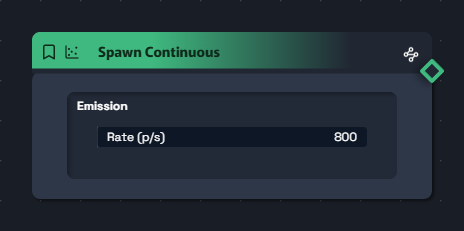
grouped inside sections with a darker background. Here's the anatomy of a Spawn Continuous:
Chaque node CKFlow a une tête en dégradé (couleur de phase à gauche → gris foncé à droite),
des ports en diamant qui sortent des bords gauche/droit pour le brancher, et des widgets (sliders, toggles, sélecteurs)
regroupés dans des sections au fond plus sombre. Voici l'anatomie d'un Spawn Continuous :
1
Gradient headerHeader en dégradé
Phase color on the left → dark grey #202632 on the right. A quick tour of phases: green = spawn, pale green = init, cyan = field, orange = force, yellow = modify, red = behavior, purple = render.
Couleur de phase à gauche → gris foncé #202632 à droite. Tour d'horizon des phases : vert = spawn, vert pâle = init, cyan = field, orange = force, jaune = modify, rouge = behavior, violet = render.
2
Diamond portsPorts en diamant
The diamonds that stick out of the edges (left = inputs, right = outputs). Colors by type: blue = particles / data, orange = image, cyan = field, teal = shape. Drag from one port to another to connect them.
Les losanges qui sortent des bords (gauche = entrées, droite = sorties). Couleurs par type : bleu = particles / data, orange = image, cyan = field, teal = shape. Drag d'un port à un autre pour les relier.
3
Sections & widgetsSections & widgets
Each section has a darker background #232A37 and groups widgets together: sliders with readable values, toggles, selects, color pickers, presets… All animatable and exposable as ports for external control (OSC, MIDI, audio).
Chaque section a un fond plus sombre #232A37 et regroupe des widgets : sliders avec valeur lisible, toggles, selects, sélecteurs de couleur, presets… Tous animables et exposables en port pour pilotage externe (OSC, MIDI, audio).
Overview
Vue d'ensemble
A complete chain
Une chaîne complète
Here's what a simple pipeline looks like in the canvas: 5 nodes connected by blue wires (the particle flow) — this is the baseline that every recipe will build on.
Voici à quoi ressemble un pipeline simple dans le canvas : 5 nodes reliés par des wires bleus (le flux de particules) — c'est la base que toutes les recettes vont enrichir.
Real capture from the CKLive canvas — spawn → init → force → modify → render, wires colored by phase, diamond ports
Capture réelle du canvas CKLive — spawn → init → force → modify → render, câbles colorés par phase, ports en diamant
Particles (data)
Particules (data)
Image
Field
Shape
ACT 1 — SPAWNACTE 1 — SPAWN
The sources
Les sources
Where do particles come from? Three taps, three philosophies.
Choose how your flow is triggered: continuously, by an event, or by another cloud in the graph.
D'où sortent les particules ? Trois robinets, trois philosophies.
Choisis comment ton flux est déclenché : en continu, par un événement, ou par un autre cloud du graphe.
Spawn Continuous
Steady emitter at an adjustable rate — a particle tap.
Émetteur constant à débit réglable — un robinet de particules.
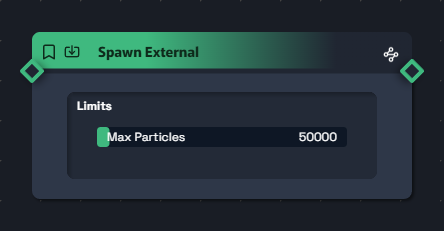
Receives a particle flow coming from elsewhere (detection, segmentation, OSC…).
Reçoit un flux de particules venu d'ailleurs (détection, segmentation, OSC…).
Connectable Particles input
Entrée Particles branchable
cap_max (defensive limit)
cap_max (limite défensive)
Spray particles out of a webcam silhouette or body tracking.
Faire jaillir des particules depuis une silhouette webcam ou un tracking corporel.
Spawn From Particle
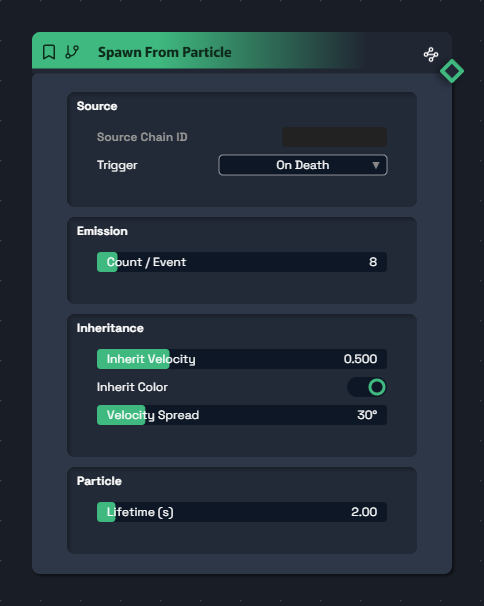
Child emitter triggered by another chain — chained events.
Émetteur enfant déclenché par un autre chain — chaîne d'événements.
trigger on_death · on_collision · rate
count 1 – 100 particles per event
count 1 – 100 particules par événement
inherit_velocity 0 – 2
Death explosions, impact sparks, firework sub-emitters.
Explosions à la mort, étincelles d'impact, sub-emitters de feu d'artifice.
ACT 2 — INITACTE 2 — INIT
The birth moment
L'apparition
At the exact moment each particle is born, these three nodes decide its initial conditions:
position, velocity, and visual look.
Au moment exact où chaque particule naît, ces trois nodes décident de ses conditions initiales :
position, vélocité, et habillage visuel.
Init Position
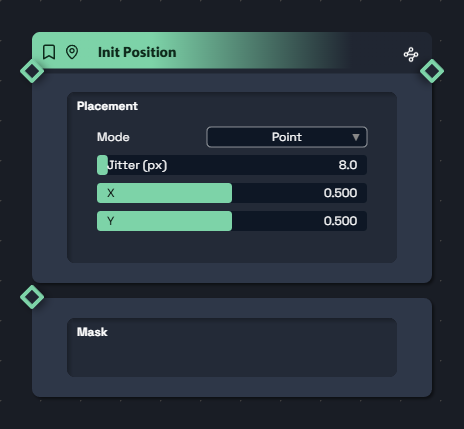
Defines WHERE particles appear — 9 geometric patterns.
Définit OÙ les particules apparaissent — 9 patterns géométriques.
mode point · line · circle · disc · grid · plane · sphere · cube · from_image
jitter 0 – 200 px (placement scatter)
jitter 0 – 200 px (flou de placement)
from_image mode: rejection sampling on a mask
Mode from_image : rejection sampling sur masque
Rain particles down from a webcam face outline.
Faire pleuvoir des particules depuis le contour d'un visage en webcam.
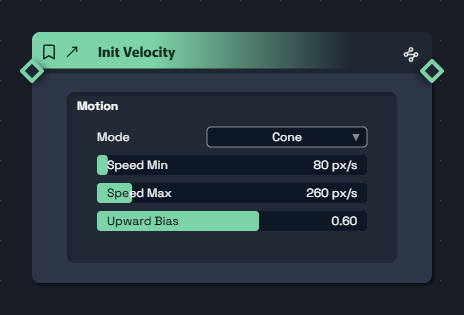
Init Velocity
Sets the initial direction — cone, outward, inward, random.
Définit la direction initiale — cone, outward, inward, random.
mode cone · outward · inward · random_sphere
speed_min/max 0 – 2000 px/s
upward_bias (reverse-gravity, flame-like)
upward_bias (gravité inversée façon flammes)
half_angle 0 – 180° (3D mode)
Geysers, radial big-bang, fireworks.
Geysers, big-bang radial, feux d'artifice.
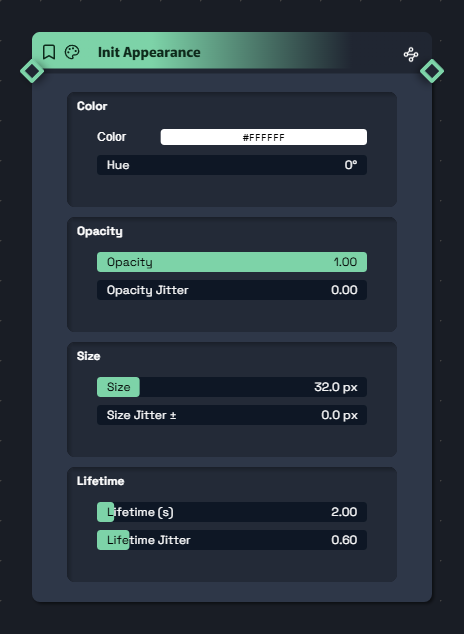
Init Appearance
Color, opacity, size, lifetime at spawn time.
Couleur, opacité, taille, durée de vie au spawn.
color + hue 0 – 360° (exposable port)
color + hue 0 – 360° (port exposable)
opacity + opacity_jitter
size 0.5 – 200 px + size_jitter
lifetime 0.1 – 30 s + lifetime_jitter
A confetti-batch of colored stars with mismatched sizes and varied lifespans.
Une pâte d'étoiles colorées avec tailles disparates et vies variables.
ACT 3 — FORCESACTE 3 — FORCES
The physics
La physique
Seven additive forces, stackable in any order. Each one adds an acceleration
to every particle. Stack freely: a realistic scene almost always has
gravity + drag + turbulence running in the background.
Sept forces additionnelles, à empiler dans n'importe quel ordre. Chacune ajoute une accélération
à chaque particule. Cumul libre : une scène réaliste a presque toujours
gravité + drag + turbulence en fond.
The attractor for real
L'attracteur en vrai
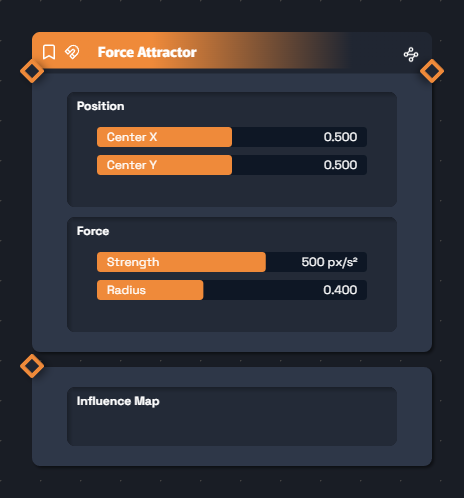
Here's what a Force Attractor node looks like in the canvas: an orange header (the "force" phase color),
a blue input port to receive particles, a blue output port. Inside, two sections — Position and Force — with their widgets.
You can set a negative strength to turn the magnet into a repulsor, or plug an image into the input to modulate the field pixel by pixel.
Voici à quoi ressemble un node Force Attractor dans le canvas : un header orange (couleur de la phase "force"),
un port bleu en entrée pour recevoir les particules, un port bleu en sortie. À l'intérieur, deux sections — Position et Force — avec leurs widgets.
Tu peux strength négative pour transformer l'aimant en répulseur, ou brancher une image sur l'entrée pour moduler le champ pixel par pixel.
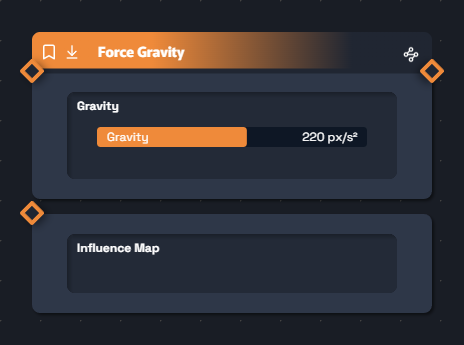
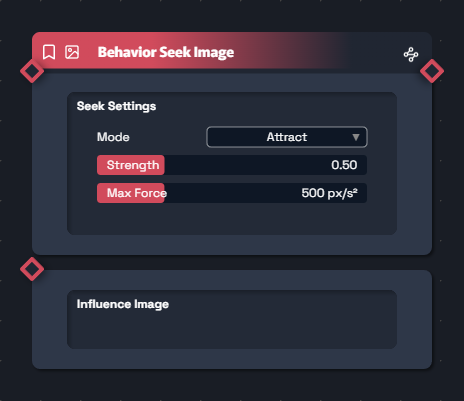
Force Gravity
Free fall — or rise, if you flip the sign.
Chute libre — ou montée si tu inverses.
gravity -2000 → +2000 px/s²
Influence input (image modulates the fall pixel by pixel)
Entrée Influence (image module la chute pixel par pixel)
Snow, confetti, rising smoke (negative gravity).
Neige, confettis, fumée qui monte (gravité négative).
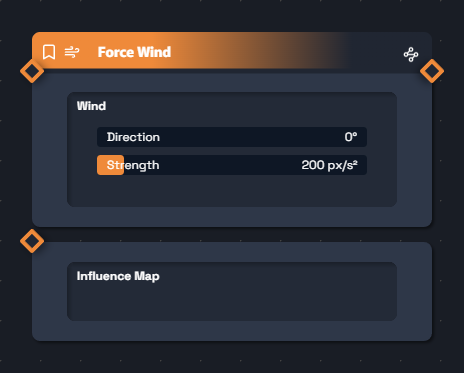
Force Wind
Directional blow with gusts.
Souffle directionnel avec rafales.
direction 0 – 360° + strength
gust_amplitude + gust_speed
Autumn leaves, stormy haze, sails in the wind.
Feuilles d'automne, brume orageuse, voile dans le vent.
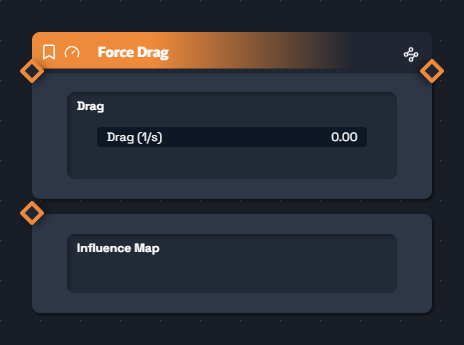
Force Drag
Friction — stops particles from flying off to infinity.
Frottement — empêche la fuite à l'infini.
drag 0 – 10 per second (exponential rate)
drag 0 – 10 par seconde (taux exponentiel)
Tame an explosive simulation, calm the chaos.
Étouffer une simulation explosive, calmer le chaos.
Force Attractor
Point magnet — attracts or repels depending on sign.
Aimant ponctuel — attire ou repousse selon le signe.
center_x/y 0 – 1 normalized
center_x/y 0 – 1 normalisés
strength -2000 → +2000 (negative = repels)
strength -2000 → +2000 (négatif = répulse)
radius 0.01 – 1 (smooth falloff)
radius 0.01 – 1 (falloff doux)
Black hole, vortex, particles fleeing the mouse cursor.
Trou noir, vortex, particules qui fuient le pointeur souris.
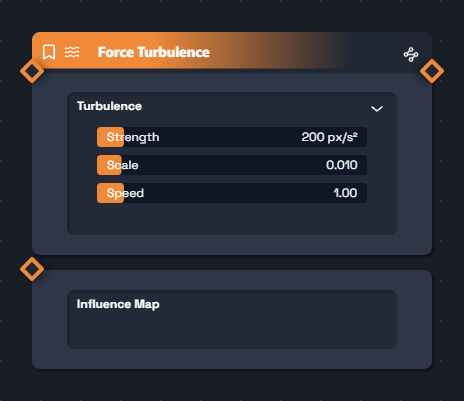
Force Turbulence
Compressive Perlin field — organic noise.
Champ de Perlin compressif — bruit organique.
strength 0 – 2000 px/s²
scale 0.001 – 0.1 (big swirls vs fine grain)
scale 0.001 – 0.1 (gros tourbillons vs grain fin)
speed 0 – 10 (field animation speed)
speed 0 – 10 (vitesse d'animation du champ)
Shifting sand, electric snow, nervous energy.
Sable agité, neige électrique, énergie nerveuse.
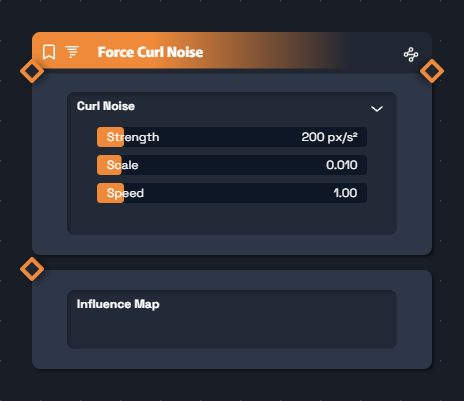
Force Curl Noise
Divergence-free fluid swirls — the clean "smoke/ink" effect.
Tourbillons fluides sans divergence — l'effet "fumée/encre" propre.
strength, scale, speed
Ink in water, stylized smoke, animated mist — the most cinematic of the bunch.
Encre dans l'eau, fumée stylisée, brume animée — le plus cinématographique.
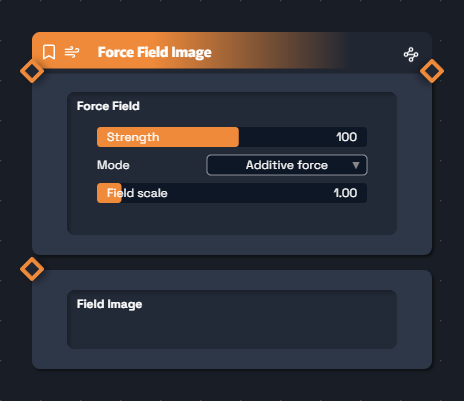
Force Field Image
Vector field driven by an image (R = X, G = Y).
Champ vectoriel piloté par une image (R = X, G = Y).
strength -2000 → +2000 (sign reverses the flow)
strength -2000 → +2000 (signe inverse le flux)
mode additive_force · set_velocity (kinematic)
field_scale 0.1 – 10
Hand-painted flow-map, particles tracing an animated drawing.
Flow-map peint à la main, particules qui suivent un dessin animé.
Gravity — uniform fall
Gravity — chute uniforme
Wind — sideways gust
Wind — souffle latéral
Attractor — radial convergence
Attractor — convergence radiale
Curl Noise — fluid swirls
Curl Noise — tourbillons fluides
BEHAVIORS
Collective intelligence
L'intelligence collective
Where forces apply physics, behaviors give each particle
a personality: bouncing, fleeing, following a path, flocking. It's the leap from
matter to life.
Là où les forces appliquent une physique, les behaviors donnent à chaque particule
un comportement : rebondir, fuir, suivre un chemin, voler en nuée. C'est le passage de
la matière à la vie.
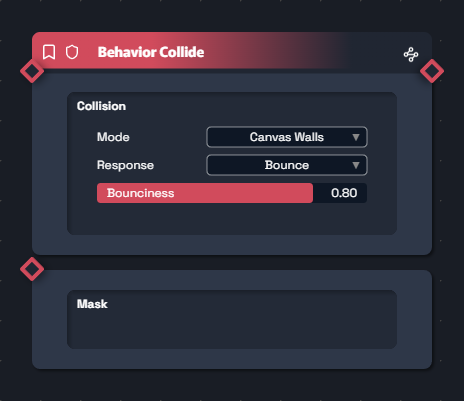
Behavior Collide
Walls, circle or image silhouette — bounce, kill or stick.
Murs, cercle ou silhouette image — bounce, kill ou stick.
mode plane · circle · image
response bounce · kill · stick
bounciness 0 – 1
Particles bouncing off a webcam silhouette.
Particules qui rebondissent sur la silhouette webcam.
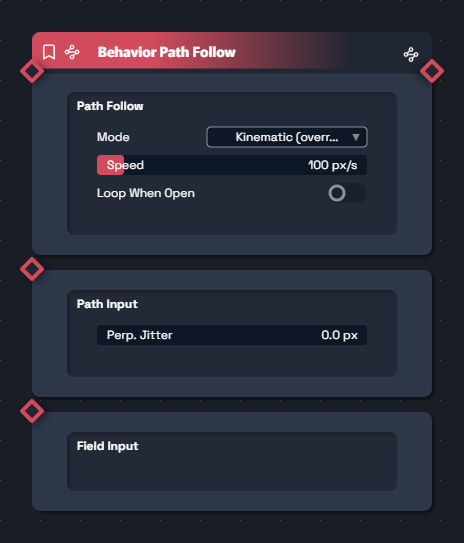
perpendicular_jitter 0 – 100 px (épaisseur du flux)
loop_when_open (loop or clamp)
loop_when_open (boucle ou clamp)
Caravans along a drawing, scripted rivers, animated calligraphy.
Caravanes le long d'un dessin, rivières scriptées, calligraphie animée.
ACT 4 — MODIFYACTE 4 — MODIFY
The modifiers
Les modificateurs
Eleven nodes to rewrite size, color, rotation, position on the fly.
Whether driven by age, index, local density or an image,
everything that can move is sculptable.
Onze nodes pour réécrire en cours de route taille, couleur, rotation, position.
Que ce soit en fonction de l'âge, de l'index, de la densité locale ou d'une image,
tout ce qui peut bouger est sculptable.
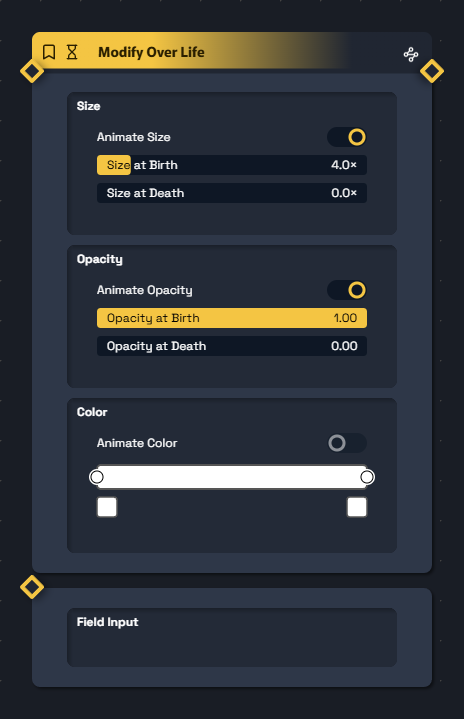
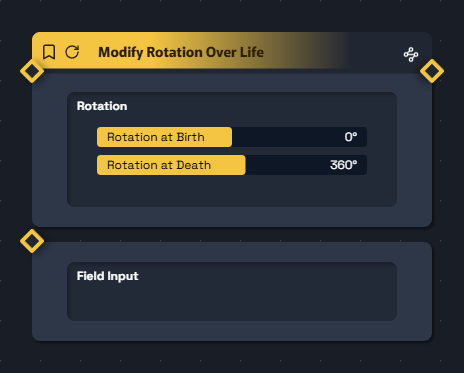
Modify Over Life
Animates size, opacity, color (multi-stop gradient) over the lifetime.
Anime taille, opacité, couleur (gradient multi-stops) sur la durée de vie.
enable_size/opacity/color (toggles)
size_start / size_end 0 – 32×
Multi-stop temporal gradient for color
Gradient temporel multi-stops pour la couleur
Sparks that are born white and die red while shrinking.
Étincelles qui naissent blanches et meurent rouges en rétrécissant.
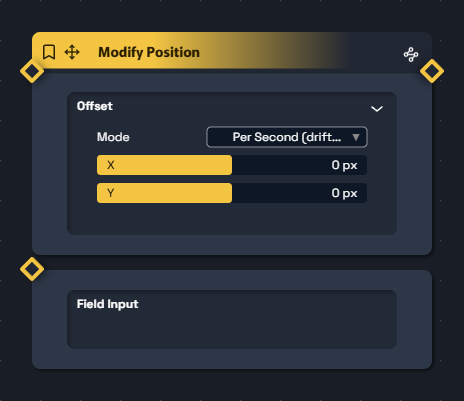
Modify Position
Forced X/Y/Z translation, gated by an optional Field.
Translation X/Y/Z forcée, gated par un Field optionnel.
mode per_second drift · absolute snap
offset_x/y/z -4000 → 4000 px
Linear drift of a layer, field-gated localized teleportation.
Dérive linéaire d'une nappe, téléportation localisée par champ.
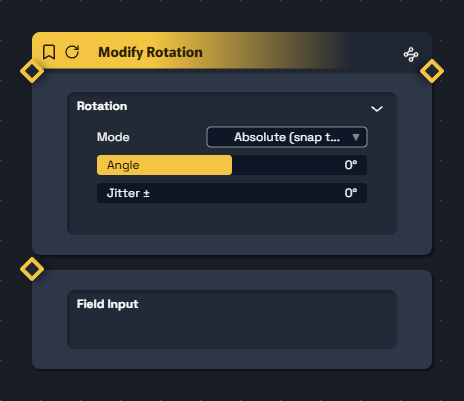
Modify Rotation
Forces an angle (snap) or a rotation speed for sprites.
Force un angle (snap) ou une vitesse de rotation des sprites.
mode absolute · per_second
rotation -720 → 720° + jitter
Whirlwind of leaves, de-synchronized propellers.
Tourbillon de feuilles, hélices désynchronisées.
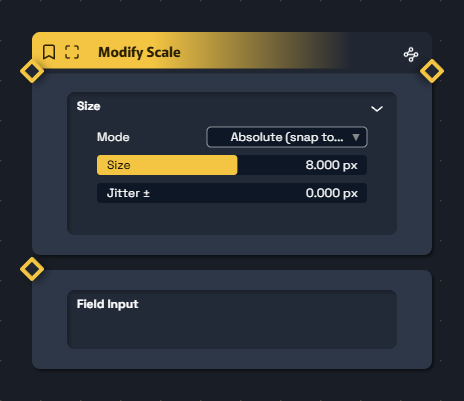
Modify Scale
Absolute snap of the size in pixels, with jitter.
Snap absolu de la taille en pixels, avec jitter.
mode absolute · per_second growth
target_size -200 → 200 px, jitter
Pulse at a moment T, particles swelling as they cross a zone.
Pulse à un instant T, particules qui grossissent en traversant une zone.
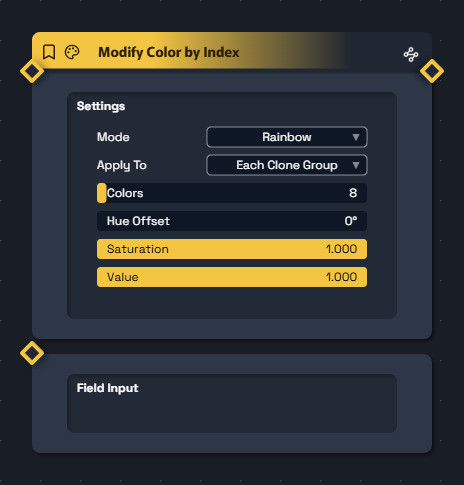
Modify Color By Index
Colors particles by index — rainbow or gradient.
Colore par numéro de particule — rainbow ou gradient.
color_mode rainbow · gradient
apply_to per_particle · per_clone_group
colors 1 – 200 (number of hues)
colors 1 – 200 (nombre de teintes)
Multicolor explosions synced to a radial pattern.
Explosions multicolores synchronisées au pattern radial.
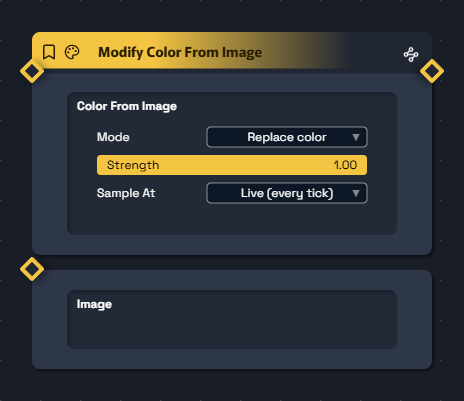
Modify Color From Image
Particles grab their color from an image (camera, video).
Particules récupèrent leur couleur depuis une image (caméra, vidéo).
mode replace · luminance modulate
sample_at live · lock_at_spawn
Particle-pixels from a video, living paint.
Particules-pixels d'une vidéo, peinture vivante.
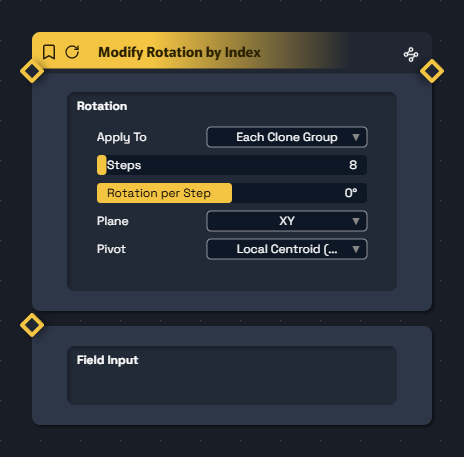
Modify Rotation By Index
Incremental rotation by index — radial fan for clones.
Rotation incrémentale par index — fan radial pour les clones.
Confetti spinning multiple turns across their lifetime.
Confettis qui pirouettent plusieurs tours sur leur vie.
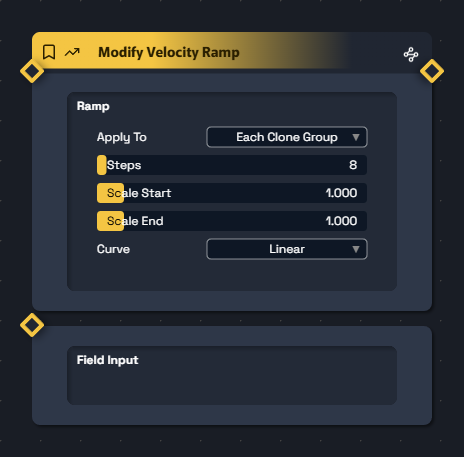
Modify Velocity Ramp
Staggers velocity by index — cascading starts.
Échelonne la vitesse par index — départs en cascade.
steps, scale_start/end 0 – 10×
curve linear · smooth · ease
Cascading shots with visible delays.
Cascades de tirs avec délais visuels.
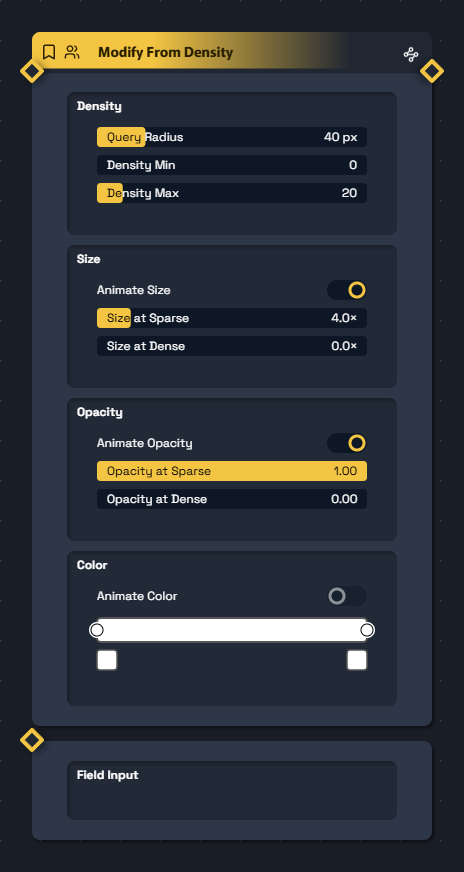
Modify From Density
Animates size / opacity / color based on local density.
Anime taille / opacité / couleur selon la densité locale.
query_radius 5 – 200 px
density_min/max (mapping bounds)
density_min/max (bornes du mapping)
Sparse → dense gradient
Gradient sparse → dense
Clusters that redden at pile-up, crowded zones that light up.
Amas qui rougissent au pile-up, zones bondées qui s'illuminent.
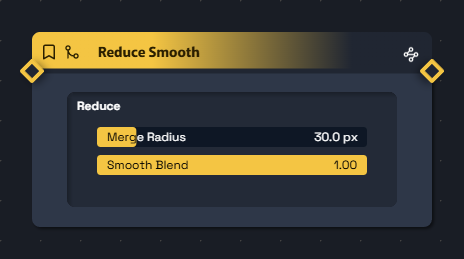
Reduce Smooth
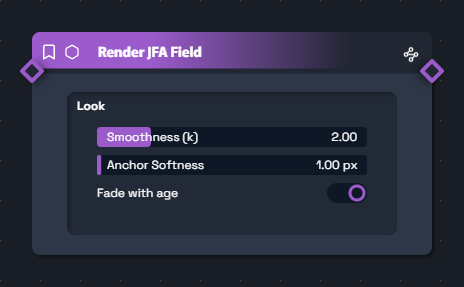
Merges neighbors for smoothed colors — ideal before JFA Field.
Fusionne les voisines pour des couleurs lissées — idéal avant JFA Field.
merge_radius 1 – 200 px
blend 0 (pure decimation) → 1 (full averaging)
blend 0 (décimation pure) → 1 (moyennage complet)
Prepare a homogeneous JFA field, smooth out a noisy cloud.
Préparer un champ JFA homogène, lisser un cloud bruité.
PATTERNS
The geometric anchors
Les ancrages géométriques
Patterns emit anchor points: they don't generate particles,
they describe a geometry. Plugged into the Clone node, they let you
instantly multiply a cloud along a line, a circle, a grid or a hexagon.
Les patterns émettent des points d'ancrage : ils ne génèrent pas de particules,
ils décrivent une géométrie. Branchés sur le node Clone, ils permettent
de multiplier instantanément un cloud sur une ligne, un cercle, une grille ou un hexagone.
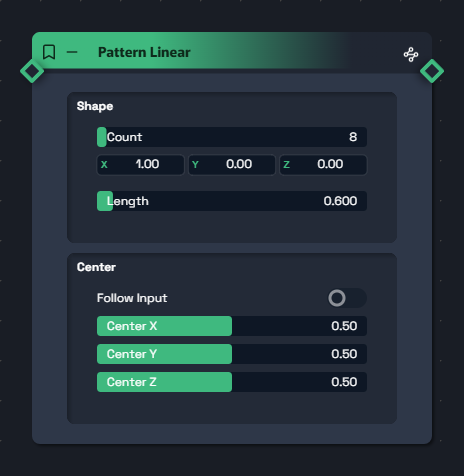
Pattern Linear
Line of N anchors in a 3D direction.
Ligne de N anchors dans une direction 3D.
count 1 – 200
direction vec3, length 0.01 – 10
follow_input (follows a cloud's centroid)
follow_input (suit le centroïde d'un cloud)
Aligned shots, position ladder, single-file line.
Alignement de tirs, échelle de positions, file indienne.
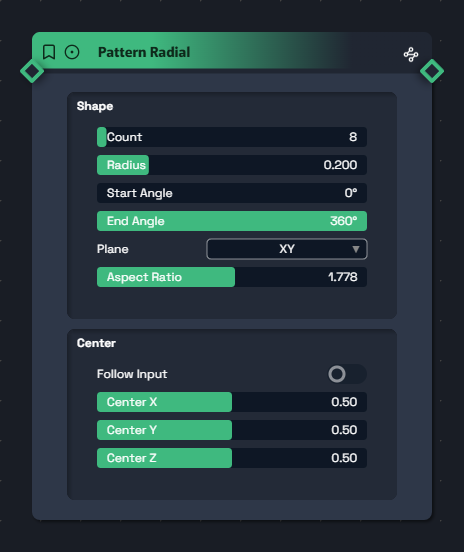
Pattern Radial
Circle or arc of N anchors.
Cercle ou arc de N anchors.
count, radius 0.01 – 1
start_angle/end_angle 0 – 360°
plane XY · XZ · YZ, aspect_ratio
Radial fireworks, mandalas, clocks.
Feux d'artifice radiaux, mandalas, horloges.
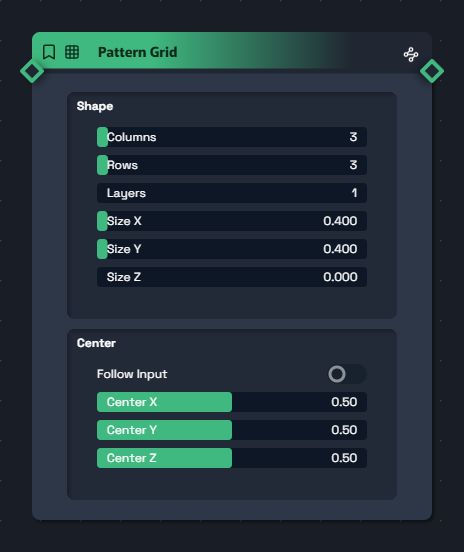
Pattern Grid
Rectangular 2D or 3D grid.
Grille rectangulaire 2D ou 3D.
count_x/y/z 1 – 50
size_x/y/z 0.01 – 10
LED matrix, wall of particles, living checkerboard.
Matrice de LEDs, mur de particules, échiquier vivant.
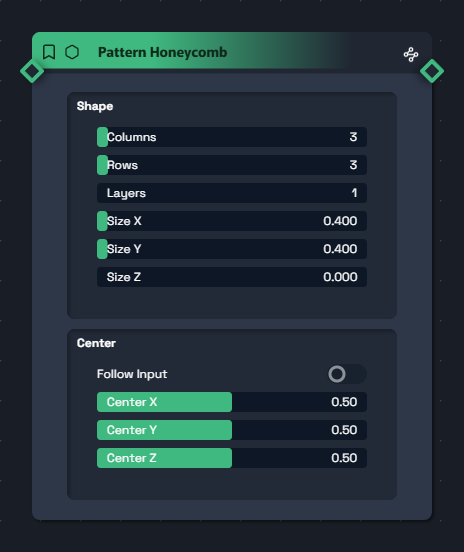
Pattern Honeycomb
Hexagonal grid (odd rows offset).
Grille hexagonale (rows impaires décalées).
Same params as Grid
Mêmes params que Grid
Half-column offset on odd rows
Décalage d'une demi-colonne sur les rangées impaires
Beehive, dense organic patterns, scales.
Nid d'abeilles, motifs organiques denses, écailles.
Linear
Radial
Grid
Honeycomb
CLONE
The multiplier
Le multiplicateur
A single gateway to geometric multiplication.
Plug a particle cloud into Input, a pattern into Pattern:
you get as many copies of the cloud as there are anchors in the pattern. It's Cinema 4D's MoGraph philosophy, GPU-accelerated and real-time.
Une seule porte d'entrée vers la multiplication géométrique.
Branche un cloud de particules sur Input, un pattern sur Pattern :
tu obtiens autant de copies du cloud que d'anchors dans le pattern. C'est la philosophie MoGraph de Cinema 4D, version GPU et temps réel.
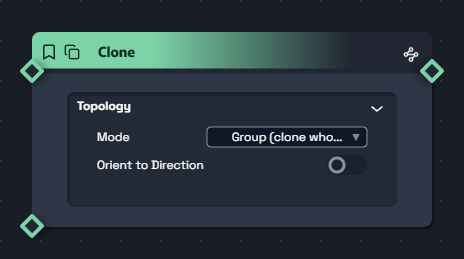
Clone
Cartesian product Input × Pattern — duplicates a cloud at every anchor.
Produit cartésien Input × Pattern — duplique un cloud sur chaque anchor.
modegroup (whole cloud at each anchor) · per_particle (pattern around each particle)
modegroup (tout le cloud à chaque anchor) · per_particle (pattern autour de chaque particule)
orient — each clone facing outward (radial → outward fan)
orient — chaque clone face à l'extérieur (radial → éventail outward)
rate_mode each · split
8 fountains arranged in a circle, grid instancing, lightweight fractals.
8 fontaines arrangées en cercle, instancing par grille, fractales légères.
ACT 5 — RENDERACTE 5 — RENDER
The rasterization
La rasterisation
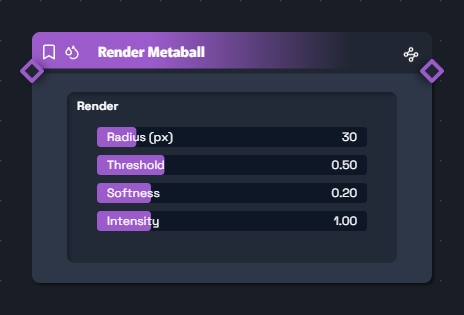
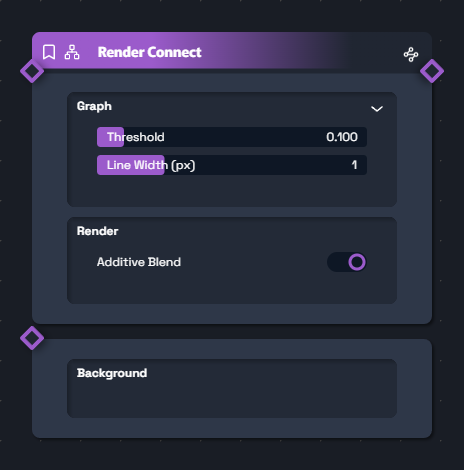
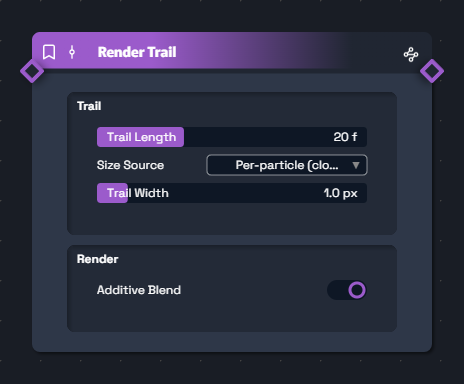
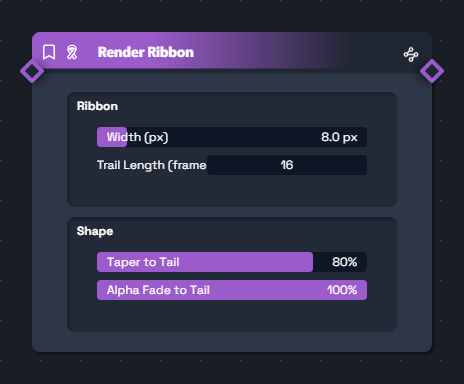
Seven rasterizers to turn your cloud into an image. Each has its own visual signature:
small and luminous, organic blob, constellation, comet trail, thick ribbon or continuous field.
You can plug multiple renderers in parallel onto the same cloud to stack aesthetics.
Sept rasterizers pour transformer ton cloud en image. Chacun a une signature visuelle propre :
discrète et lumineuse, blob organique, constellation, trace de comète, ruban épais ou champ continu.
Tu peux brancher plusieurs renderers en parallèle sur le même cloud pour cumuler les esthétiques.
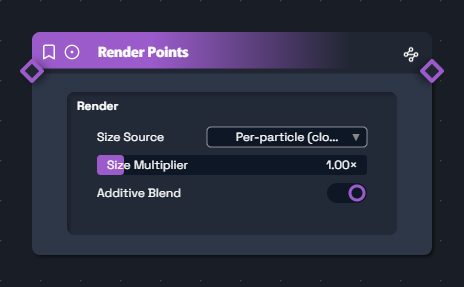
Render Points
Soft additive discs — the canonical render.
Discs doux additifs — le rendu canonique.
size_multiplier 0 – 10× (× cloud.sizes)
blend_additive (toggle)
Nebulae, stars, fireflies.
Nébuleuses, étoiles, lucioles.
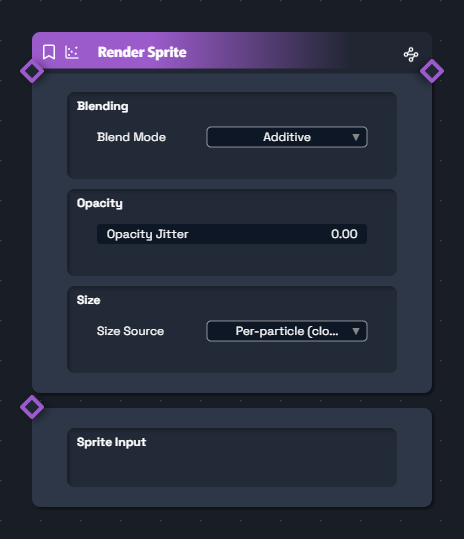
Render Sprite
Custom image sprites with 6 blend modes.
Sprites image personnalisés avec 6 blend modes.
Sprite input (image — falls back to a default disc)
For crossing from the particle world (raster) into the shapes world (anti-aliased vector).
Ideal when you want crisp, clean, controlled forms instead of fuzzy blobs.
Pour basculer du monde des particules (raster) vers le monde des shapes (vectoriel anti-aliasé).
Idéal quand tu veux des formes nettes, propres, contrôlées au lieu de blobs flous.
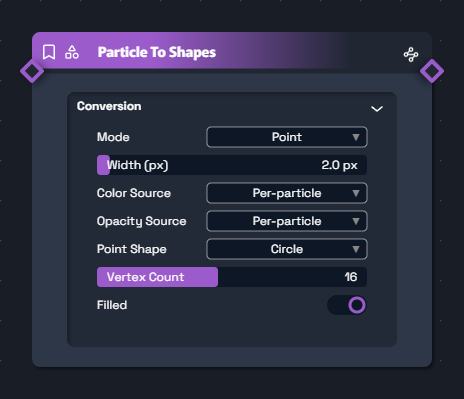
Particle To Shapes
Converts the cloud into a ShapeCloud for the ShapeRenderer (DDA + AA).
Convertit le cloud en ShapeCloud pour le ShapeRenderer (DDA + AA).
mode point · lines_proximity · lines_sequential
point_shape circle · square, point_vertex_count 3 – 32
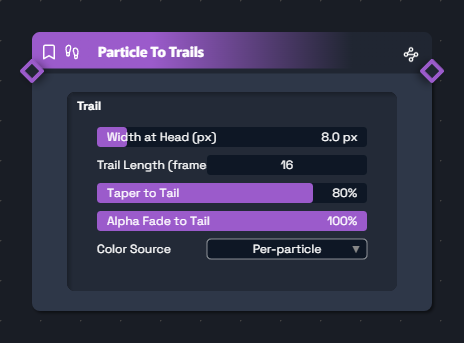
ShapeCloud of tapered trail segments — vector ribbon.
ShapeCloud de segments de trails effilés — ribbon vectoriel.
width_base 1 – 64 px
trail_length 2 – 64 frames
taper_to_tail / alpha_fade_to_tail
Clean, anti-aliased vector trails through the ShapeRenderer.
Trails vectoriels propres et anti-aliasés via ShapeRenderer.
✦ MASTERCLASS
Spatial × Particles — the main event
Spatial × Particles — le grand jeu
This is where CKFlow reveals its true potential. The spatial nodes (ShapeCloud, Fields, Spatial Renderer)
are not a separate module: they talk to particles. A detected silhouette becomes a rail,
a 3D sphere becomes a magnet, a rectangle becomes a mutation zone. You sculpt the effect in space,
not in sliders.
C'est ici que CKFlow révèle son vrai potentiel. Les nodes spatial (ShapeCloud, Fields, Spatial Renderer)
ne sont pas un module à part : ils conversent avec les particules. Une silhouette détectée devient un rail,
une sphère 3D devient un aimant, un rectangle devient une zone de mutation. Tu sculptes l'effet dans l'espace,
pas dans des sliders.
🧍
Example — "Body Painter"
Exemple — "Body Painter"
Here's exactly what this chain looks like in the canvas: the silhouette detected by the camera becomes a magnetic rail, particles glide along it and are rendered as vectors.
Voici exactement à quoi ressemble cette chaîne dans le canvas : la silhouette détectée par la caméra devient un rail magnétique, les particules glissent dessus et sont rendues en vectoriel.
Detection → Spatial
Camera
Shape
Modecontour
Spawn Continuous
Particles
Rate
p/s15k
Behavior Path Follow
Particles
Particles
Path
Modekinematic
Speed
px/s300
Spatial Renderer
Cloud
Image
AA
Stroke
px2
The teal wire = ShapeCloud (the silhouette).
The blue wire = ParticleCloud (the flow).
Le wire teal = ShapeCloud (la silhouette).
Le wire bleu = ParticleCloud (le flux).
① The bridges between the two worlds
① Les ponts entre les deux mondes
Particle → Shapes
Every particle becomes a vector shape (circle, polygon, line between neighbors).
Chaque particule devient une forme vectorielle (cercle, polygone, ligne entre voisines).
lines_proximity mode = automatic constellation
Mode lines_proximity = constellation auto
lines_sequential mode = connected snake
Mode lines_sequential = serpent connecté
Crisp render via the Spatial Renderer (anti-aliased)
Rendu net via le Spatial Renderer (anti-aliasé)
Clean polygon/line rendering without pixelation, instant "data-viz" look.
Rendu propre en polygones/lignes sans pixelisation, look "data-viz" instantané.
Particle → Trails (vector)(vectoriel)
Keeps the N last positions in memory and builds tapered ShapeCloud ribbons.
Garde en mémoire les N dernières positions et crée des rubans effilés ShapeCloud.
Shapes output ⇒ crisp vector rendering
Sortie shapes ⇒ rendu vectoriel net
trail_length 2 – 64 frames
taper_to_tail + alpha_fade_to_tail
Elegant "C4D-style" trails, cleaner than the pixel-based render_trail.
Traînées élégantes "à la C4D", plus propres que render_trail pixel-based.
Behavior Path Follow
A ShapeCloud (drawn shape or primitive) becomes a magnetic rail.
Un ShapeCloud (forme dessinée ou primitive) devient un rail magnétique.
Path input = any ShapeCloud
Entrée Path = n'importe quel ShapeCloud
mode kinematic · steering
perpendicular_jitter = stream thickness
perpendicular_jitter = épaisseur du flux
Particles following a logo, a typeface, a silhouette outline.
Particules qui suivent un logo, une typo, un contour de silhouette.
Detection → Spatial
Camera segmentation → boxes/outlines as ShapeCloud + points as ParticleCloud in one shot.
Segmentation caméra → boîtes/contours en ShapeCloud + points en ParticleCloud d'un coup.
Automatic mask → vertices conversion
Conversion automatique masque → vertices
Two simultaneous outputs (shapes + particles)
Deux sorties simultanées (shapes + particles)
Any real-time "body becomes particles" pipeline, no config needed.
Tout flux temps-réel "le corps devient particules" sans config.
Spatial Math / Merger
Merges or interpolates multiple clouds (particles + shapes mixed).
Fusionne ou interpole plusieurs clouds (particules + shapes mêlés).
add · lerp · min · max operations
Opérations add · lerp · min · max
Plug in any spatial type
Branche n'importe quel type spatial
Morphing between an abstract shape and a live-detected silhouette.
Morphing entre une forme abstraite et une silhouette détectée live.
Spatial Renderer
A single renderer for particles AND shapes — plug in any cloud.
Un seul renderer pour particules ET shapes — branche n'importe quel cloud.
Type-agnostic (ParticleCloud + ShapeCloud)
Type-agnostique (ParticleCloud + ShapeCloud)
Unified 3D compositing in the same scene
Compositing 3D unifié dans la même scène
Mix particles + vectors without switching renderer — one terminal node.
Mixer particules + vecteurs sans switch de renderer — un seul nœud terminal.
② Fields, animated 3D masks
② Les Fields, des masques 3D animés
A Field is an invisible zone of influence in space. Instead of applying an effect to every particle,
it applies only where the field is bright (1 = full effect, 0 = no effect).
Conceptually: a 3D effect brush you move around with a gizmo.
Combinable via field_blend (Add, Multiply, Max, Subtract, Screen…).
Un Field est une zone d'influence invisible dans l'espace. Au lieu d'appliquer un effet à toutes les particules,
il s'applique uniquement là où le field est lumineux (1 = effet plein, 0 = aucun effet).
Conceptuellement : un pinceau d'effet 3D que tu déplaces avec un gizmo.
Combinable via field_blend (Add, Multiply, Max, Subtract, Screen…).
Plug any field into the Field input of a behavior or modify — the effect only acts inside the illuminated zone.
Branche n'importe quel field sur l'entrée Field d'un behavior ou modify — l'effet n'agit que dans la zone illuminée.
📌 Wiring example — a zoned magnet
📌 Exemple de branchement — un aimant zoné
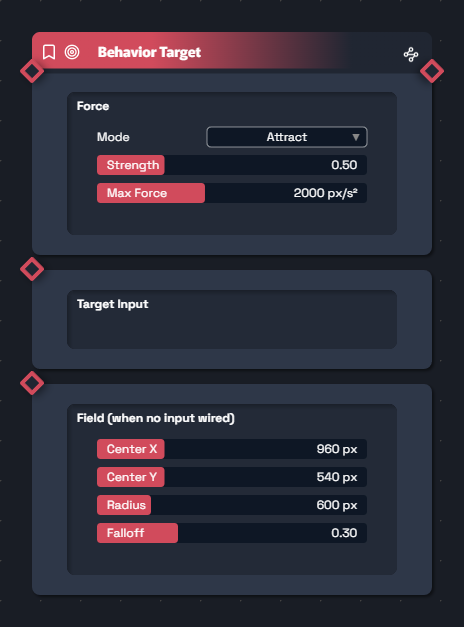
The Field Sphere outputs a cyan wire that goes into the Behavior Target's "Field" port. Result: particles are only attracted inside the sphere; move the gizmo around the scene to relocate the effect zone.
Le Field Sphere sort un wire cyan qui rentre dans le port "Field" du Behavior Target. Résultat : les particules ne sont attirées que à l'intérieur de la sphère, tu peux déplacer le gizmo dans la scène pour bouger la zone d'effet.
Spawn Continuous
Particles
Rate
p/s5k
Field Sphere
Field
Radius
norm0.30
Falloff
soft0.70
Invert
Behavior Target
Particles
Particles
Field
Modeattract
Strength
×1.5
🧲 Local gravity zone
🧲 Zone de gravité locale
Particles are only attracted inside the 3D bubble.
Les particules ne sont attirées que dans la bulle 3D.
field_sphere→behavior_target
💨 Acceleration corridor
💨 Couloir d'accélération
Directional drift only inside the ramp — at rest elsewhere.
Drift directionnel uniquement dans la rampe — repos ailleurs.
field_linear→modify_position
📐 Spatial size boost
📐 Boost de taille spatial
Particles swell up while crossing the rectangular zone.
Les particules enflent en traversant la zone rectangulaire.
field_box→modify_scale
③ 9 wild crossover recipes
③ 9 recettes croisées dingues
Here's what the Spatial × Particles dialogue lets you do in just a few nodes. Each chain fits in 4 to 6 boxes.
Voici ce que la conversation Spatial × Particles permet de faire en quelques nodes. Chaque chaîne tient en 4 à 6 boîtes.
🛸 Logo Hunter
Particles draw an animated vector logo and then destroy it.
Les particules dessinent un logo vectoriel animé puis le détruisent.
The takeaway:
particles are the matter, Fields are the sculptors, Shapes are the structure,
and the Spatial Renderer is the camera that gathers it all into the same 3D scene.
You can stack Fields, blend ShapeClouds, combine camera detection and procedural forms —
that's where creativity explodes.
L'idée à retenir :
les particules sont la matière, les Fields sont les sculpteurs, les Shapes sont la structure,
et le Spatial Renderer est la caméra qui rassemble tout dans une même scène 3D.
Tu peux multiplier les Fields, blender les ShapeClouds, combiner détection caméra et formes procédurales —
c'est là que la créativité explose.
Inspirations
Inspirations
8 creative recipes
8 recettes créatives
For a starting point, here are eight reference chains showing how nodes fit together.
Each colored chip is a node to plug in order — and the first recipe is shown in full to set the tone.
Pour partir d'un point de référence, voici huit chaînes-types qui montrent comment les nodes s'assemblent.
Chaque chip coloré est un node à brancher dans l'ordre — et la première recette est illustrée en grand pour donner le ton.
❄️
Snowstorm — the full chain
Tempête de neige — la chaîne complète
Gentle fall, sideways wind, flakes pirouetting. 5 nodes, all connected from left to right.
Chute douce, vent latéral, flocons qui pirouettent. 5 nodes, tout est connecté de gauche à droite.
Spawn Continuous
Particles
Rate
p/s2 000
Init Position
In
Out
Modeline
Y
top0.0
Force Gravity
In
Out
Gravity
px/s²+150
Force Wind
In
Out
Direction
°180
Gust
amp0.4
Modify Rotation
In
Out
Modeper_sec
Jitter
°180
Render Sprite
Particles
Image
Sprite
Blendscreen
❄️ Snowstorm
❄️ Tempête de neige
Gentle fall, sideways wind, flakes pirouetting (compact version above).
Chute douce, vent latéral, flocons qui pirouettent (version compacte ci-dessus).
A simulation without force_drag always ends up running away. Drag at 0.5 – 2 calms the whole system without killing the motion.
Une simulation sans force_drag finit toujours par s'emballer. Drag à 0.5 – 2 calme tout le système sans tuer le mouvement.
🎯 cap_max protects your FPS
🎯 Le cap_max protège tes FPS
On Spawn Continuous, cap_max is your seatbelt. Past 1M particles, rendering starts to cost real money — set it just above what you actually see.
Sur Spawn Continuous, cap_max est ta ceinture de sécurité. Au-delà d'1M de particules, le rendu commence à coûter cher — règle au plus juste de ce que tu vois.
🎨 Modifiers stack up
🎨 Les modificateurs s'empilent
You can chain several modify_* in a row. Order matters: over_life before from_density gives a different look than the reverse.
Tu peux chaîner plusieurs modify_* à la suite. L'ordre compte : over_life avant from_density donne un look différent que l'inverse.
🔁 Clone's "per_particle" mode is explosive
🔁 Le mode "per_particle" du Clone est explosif
group mode: each anchor gets the whole cloud. per_particle mode: each particle gets the whole pattern. Use with a sensible cap_max.
Mode group : chaque anchor reçoit tout le cloud. Mode per_particle : chaque particule reçoit tout le pattern. À utiliser avec un cap_max sage.
📺 Render Points is still the cheapest
📺 Render Points reste le moins cher
For 100k+ particles, lean on additive render_points. Blobs (metaball, JFA) are gorgeous but quadratic in pixels.
Pour 100k+ particules, privilégie render_points en additif. Les blobs (metaball, JFA) sont magnifiques mais quadratiques en pixels.
🌐 Field Sphere replaces sliders
🌐 Le Field Sphere remplace les sliders
Plugging a field_sphere into behaviors / modifiers opens the door to Cinema 4D-style animated 3D masks — way more powerful than a fixed point.
Brancher un field_sphere sur les behaviors / modifiers ouvre la porte aux masques 3D animés façon Cinema 4D — bien plus puissant qu'un point fixe.
🖼 Image ports everywhere
🖼 Les ports image partout
Force gravity, attractor, color, position… almost every one accepts an image input to modulate locally. It's the key to audio-reactive and camera-reactive effects.
Force gravity, attractor, color, position… presque tous acceptent une image en entrée pour moduler localement. C'est la clé des effets audio-réactifs et caméra-réactifs.
🎭 Render in parallel, not in series
🎭 Render en parallèle, pas en série
You can plug several renderers onto the same cloud, then blend the outputs: trail + metaball = moving spheres with a wake.
Tu peux brancher plusieurs renderers sur le même cloud, puis blender les sorties : trail + metaball = sphères en mouvement avec sillage.